Common questions.
Redaction, privacy, platforms, and price.
Is the text really gone, or just covered? +
Excise PDF removes matched characters from the PDF page content rather than hiding them behind a removable annotation. It then reopens the separate copy and reports whether the information you marked was still found.
What does the receipt check? +
It checks page text, supported hidden-data categories, marked areas, and image-converted pages in the saved copy. The receipt shows what was checked and calls out anything that still needs attention.
Does it work on scanned documents? +
Excise PDF can read a scanned page with on-device OCR. OCR can miss visible text, so the receipt identifies OCR results and tells you when visual review is still required. On Windows, a rasterized page cannot receive a Verified result; it stays Review required.
Are my documents uploaded? +
No. Documents stay on your device on every platform. The direct Windows version makes one optional update check, which sends no document, file name, search term, licence key, or computer name. The Apple apps and Microsoft Store build make no network request of their own.
Can I redact a whole folder at once? +
On Windows and Mac, yes. Choose a folder and run your saved search list over its PDFs. One receipt accounts for every input, including files that were refused, failed, skipped, or not reached. Individual matches are not reviewed one by one in a folder run.
Can I search for several things at once? +
Yes. Add multiple searches to the same job: names, numbers, phrases, regular expressions, and any suggested formats you choose. Excise PDF gathers the matches from the whole list so you can review them together before anything is removed.
On Windows and Mac, the same saved search list can be reused for a folder run.
Does it change my original file? +
No. Excise PDF writes a separate redacted copy and refuses to overwrite its input.
What are the auto-detectors, and will they find everything? +
Excise PDF proposes searches for Social Security numbers, credit card numbers, IBANs, email addresses, phone numbers, and dates. It proposes; you decide. Dates are off by default.
It will not find everything. Add your own searches and review every match before the run.
Can I remove a signature, stamp, image, or other area? +
Yes. Draw a rectangle around the area. The rectangle clears that place on that page; it does not search for similar content elsewhere. Excise PDF tells you how the page will be handled before the run.
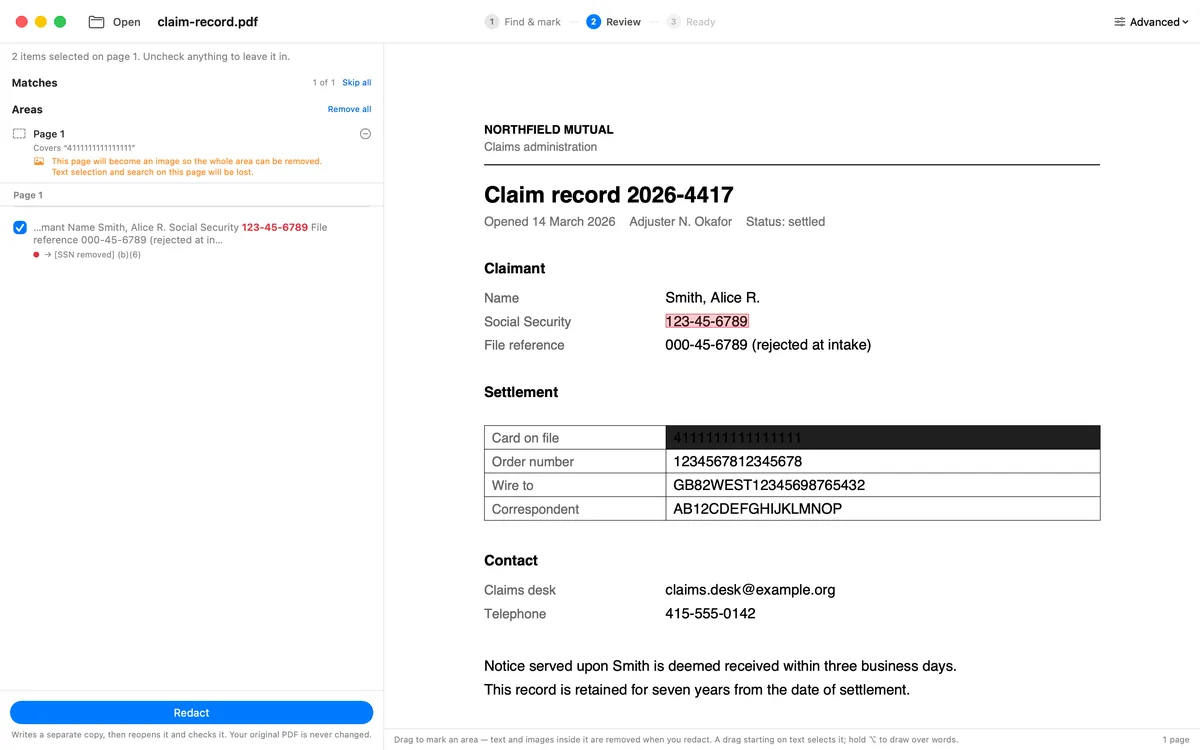
Review the marked area before you redact.
Can I print a FOIA exemption code? +
Add a code such as (b)(6) or a case reference to a search. Excise PDF prints it with the redaction and tallies what it reads back on the receipt. You decide which code applies.
Does it run on Windows? +
Yes. Excise PDF supports 64-bit Windows 10 and 11. Get it from Microsoft Store or download the direct installer. Both include the seven-day full-app trial; buy the licence on our website to keep saving redacted copies afterward. There is no Linux or web version.
Is there a command-line version or an API? +
No. Excise PDF is an app for Windows, Mac, iPhone, and iPad. Windows and Mac can process a folder you choose.
What does it cost? +
The Windows licence is $9.99 and includes 12 months of updates. It is perpetual and nothing auto-renews. The Apple launch price is $9.99 for one Universal Purchase covering Mac, iPhone, and iPad. The purchases are separate.
Is this legal advice? +
No. Excise PDF is a document tool. You decide what must be redacted and which exemption applies.
Still have a question? Contact Kalman Software support.